Understanding Your Power Meter
Find out how to read and understand your electric meter
Your standard digital meter, like so many other modern electronics, is an advanced piece of technology. First and foremost, it means that no one needs to come to your home to read your meter. Instead, it’s done wirelessly.
Digital meters have many benefits, including:
- Real-time usage data
View your monthly, weekly, daily—and even hourly—usage information. And because the meter transmits your information wirelessly, no one needs to visit your home for meter readings.
- Fast outage detection
Your meter can alert Evergy immediately if there’s an outage at your home, so we can fix it faster too. Sign up for outage alerts and you’ll also get a notification to your email or phone when there’s a power interruption.
- Participation in energy-savings programs
Digital meters also allow you to save money through voluntary programs like our Thermostat Program, and they also allow you to sign up for time-based rate plans, which give you more opportunities to save energy and money.
How to read your standard digital meter
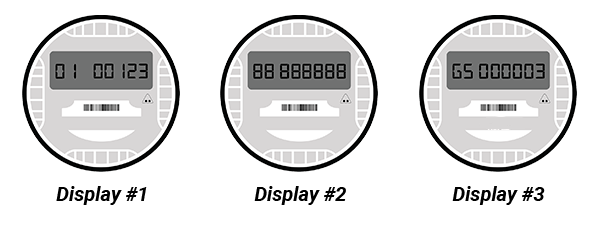
The electric meter uses a digital readout alternating between three different displays:
- Display #1 shows the actual kWh register. Example: 01 00123 (123 kWh)
- Display #2 is a segment check. All of the number segments light up to ensure that a segment is not missing and all of the numbers are readable. Example: 88 888888
- Display #3 shows a radio signal indicating that the radio is working. Example: GS 000003
Because the meter does not reset each month, you can track your monthly electricity usage by subtracting this month’s reading from last month’s reading.
Keep in mind that not all Evergy meters are identical, so your neighbor's meter might look a little different than yours.
Contractors with meter pull requests:
If you need to perform work at a location with active electricity, and to prevent us from sending trucks for an outage, please let us know.
For premises in Evergy Kansas Central, reach out to us online to let us know you're pulling a meter. Make this request at least five minutes before pulling the meter.
For premises in the Kansas City Metro area, or in Missouri, please call to schedule a meter-pull appointment: 888-471-5275